Batch import LOB data example
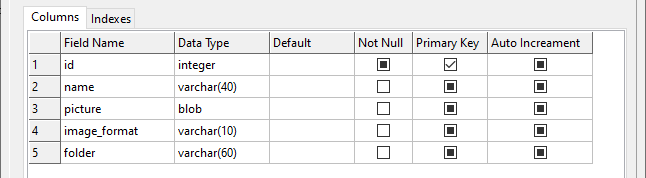
You have a table pets.
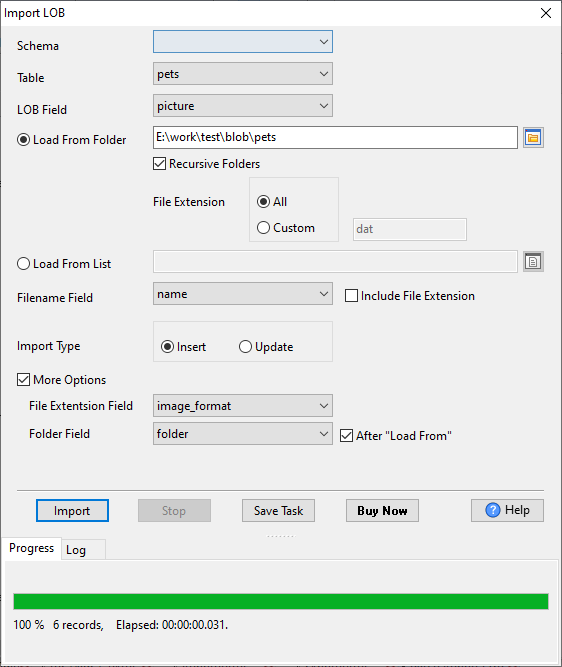
1. You can import blob data from folder F:\work\test\blob\pets to table pets.

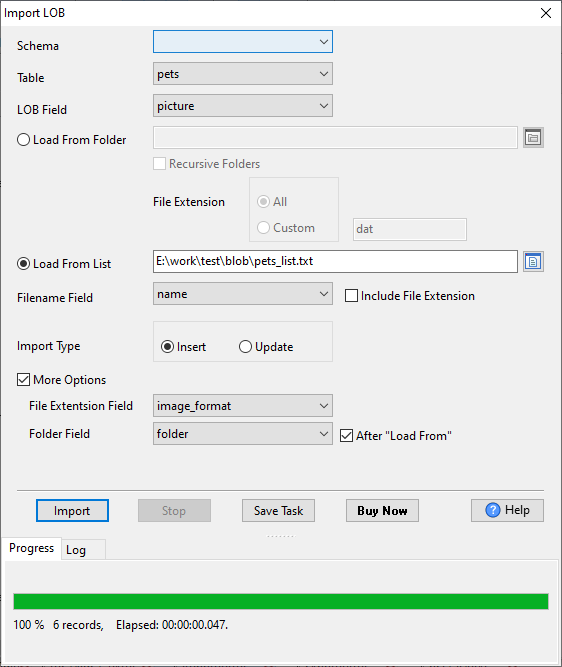
2. And you can import blob data from list.
pets_list.txt content:
E:\work\test\blob\pets\cat\cat1.gif
E:\work\test\blob\pets\cat\cat2.jpg
E:\work\test\blob\pets\cat\cat3.png
E:\work\test\blob\pets\dog\dog1.jpg
E:\work\test\blob\pets\dog\dog2.jpg
E:\work\test\blob\pets\dog\dog3.bmp
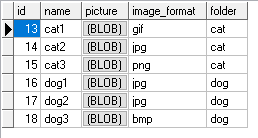
Then you get data in table pets.
| LOB Field: | Field to store file content (LOB) |
| Load From Folder: | The blob file folder |
| Load From List: | The blob file list |
| Recursive Folders: | Check this box will incluce sub folders |
| Filename Field: | Field to store file name |
| Include File Extension: | Filename with file extension will be save to Filename field |
| File Extension: | Determine what type files will be imported, for example: Custom "jpg" for .jpg files. "All" is for all file. |
| Import Type: | "Insert" for insert LOB data, "Update" for update LOB data by key Filename Field. |
| More Options: | For show/hide "File Extension Field" and "Folder Field". |
| File Extension Field: | Field to store file extension |
| Folder Field: | Field to store file folder |
| After "Load From": | Folder Field will store sub folder of "Load Form", for example, F:\test\blob\pets\cat will save to cat. |