Tail4win is a real-time log monitor and viewer
It's a GUI version of the UNIX 'tail -f' command, it can be used to view the end of a growing file.
Tail4win can display the last part of a large file quickly without loading the entire file.
By using Tail4win system administrator can monitor log files of server applications in real-time, e.g. Apache's error.log and access.log, or IIS, Tomcat, Resin, MySQL log files. And programmer can monitor application traces easy and quickly.
Current Version: 6.0, Release Date: 2026/09/09
Supports Windows, Linux, and macOS.
Price: $45.00 USD or less, Buy Now




What People Use It For
Windows has no tail of its own, and a log file is usually the only account of what a service just did. These are the everyday reasons people keep it open.
The log is growing while you read it
Only the end of the file is read, so the last lines appear immediately and new ones arrive as they are written - no Ctrl+End in Notepad, no whole-file PowerShell wait.
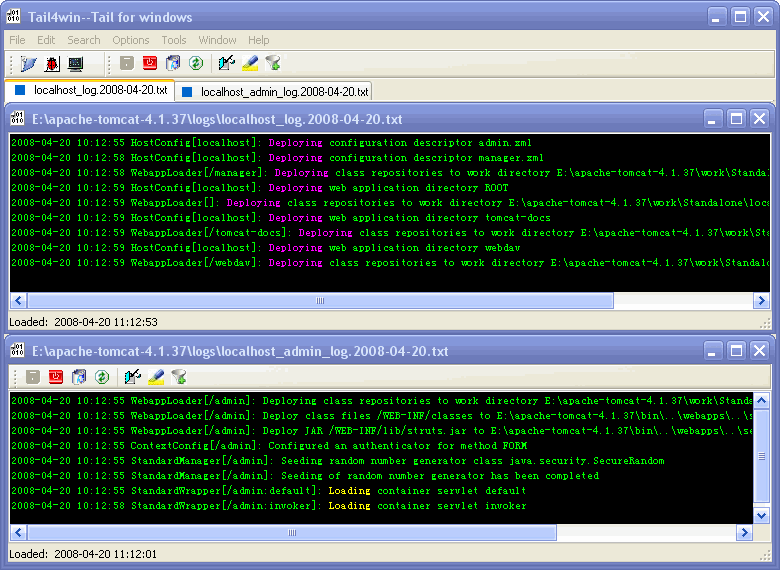
One request, two logs
A web server and a database, a front end and a job runner: several files followed in one window, each with its own highlight rules, saved as a session.
A hundred lines a second, one of them matters
A filter that works like tail -f | grep, with regular expressions, while the file is still being followed.
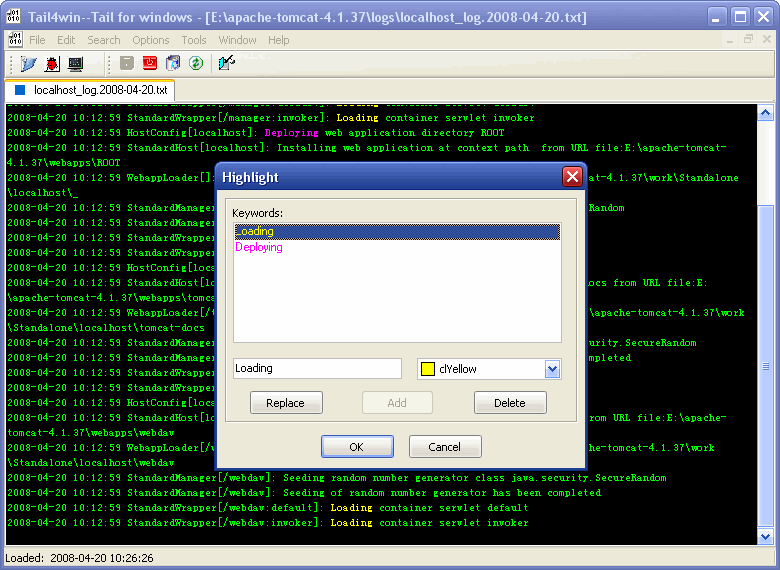
Everything stays, the important parts stand out
Highlight rules mark errors, warnings or a request id - and the lines around them are still there when the pattern was not the whole story.
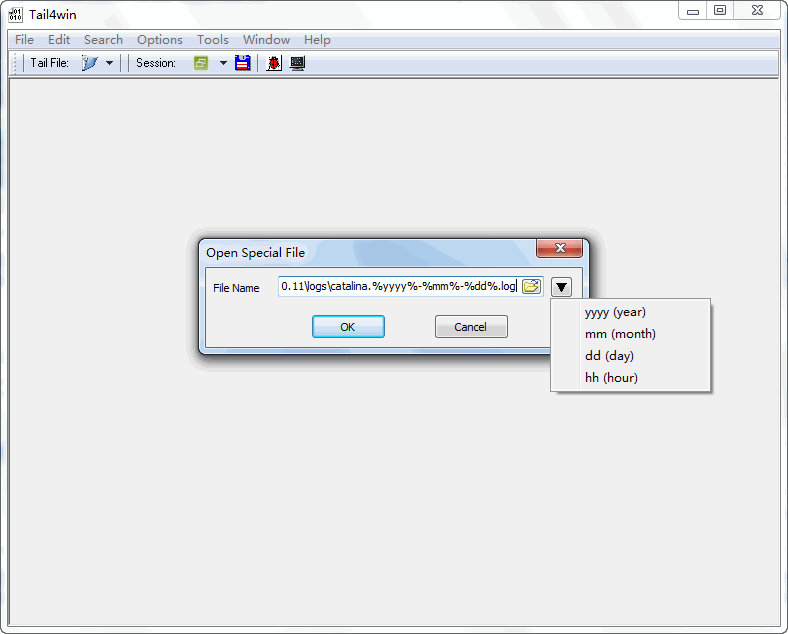
The file is not called the same thing today
Logs named by date - catalina.%yyyy%-%mm%-%dd%.log - opened from a pattern, so a saved session still points at the right file tomorrow.
The command itself: tail -f, tail on the command line, tail and grep. Common servers: IIS, Apache, Tomcat, MySQL - and the log files index. Repeating a view: sessions. Developers' traces that never reach a file: OutputDebugString capture.
Frequently Asked Questions
Does Windows have a tail command?
No. The Windows Command Prompt (cmd.exe) has no tail command. Tail4win provides both a GUI tail and a real command-line tail for Windows, so a log file can be followed the same way as on Linux.
How do I tail a log file in Windows?
Open the log file in Tail4win and turn on the real-time display. Only the end of the file is read, so it works for multi-gigabyte logs, and new lines appear as they are written. See tail -f.
What is the Windows equivalent of the Unix tail command?
PowerShell has Get-Content -Wait, but it prints the whole file before it starts waiting and needs a console window. Tail4win is the Windows equivalent that is closer to tail -f: it shows the last lines immediately, follows the file, highlights and filters, and keeps several files in one window.
Can I use the tail command in a script or scheduled task?
Yes. Tail4win also ships a command line, so the same tail can be called from a batch file, a script or Task Scheduler.
Can I monitor several log files at once?
Yes. Tail4win can watch multiple files in the same window, which is useful when an application writes to more than one log.
Can I filter or highlight the output?
Yes. Highlight rules color the lines you care about, and the filter works like tail -f | grep and accepts regular expressions. There is also a guide to tail and grep on Windows.
Does Tail4win support Linux and macOS?
Yes. The current version runs on Windows, Linux and macOS, so the same tail works on a server and on a workstation.