JSONL (JSON Lines) to JSON Array Converter
Fast, secure, and easy conversion of JSONL/NDJSON/LDJSON files to standard JSON array format. All processing happens locally on your computer - no data uploads, no file size limits.
Get DataFileConverterKey Features
100% Local Conversion
No file uploads to external servers—your data stays private and secure on your computer.
Cross-Platform Support
Works seamlessly on Windows, macOS, and Linux with identical functionality.
GUI & Command Line
Choose between intuitive graphical interface or powerful command line tools.
Handle Large Files
Optimized for performance with multi-million line JSONL files.
Format Example
JSONL format (one JSON object per line):
Converted JSON array format:
Step-by-Step GUI Guide to Convert JSONL to JSON Array
Follow these simple steps to convert your JSONL files using the graphical interface (works the same on Windows, Mac, and Linux):
Step 1: Download and Install DataFileConverter
Download the latest version of DataFileConverter from the download section below, then install it on your computer (standard installation process). The single installer works for all operating systems.
Step 2: Launch the Application and Select Source File
Open DataFileConverter and click the Start a New Convert button, you can convert single JSONL/NDJSON/LDJSON file, or merge multiple JSONL/NDJSON/LDJSON files to one JSON array, or batch convert JSONL/NDJSON/LDJSON files to JSON array.
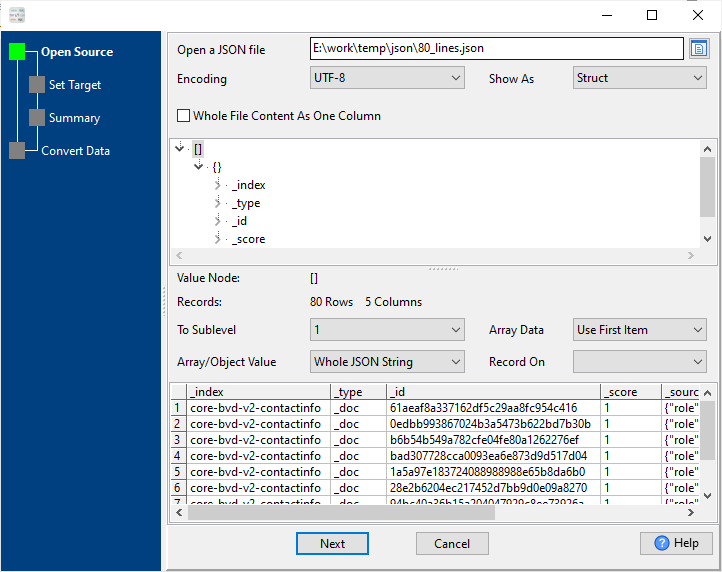
Step 3: Configure Output Settings
Under the "JSON Format" dropdown, select "Array With Name" or "Array Without Name". Choose your output directory and set encoding (UTF-8 recommended for multi-language support).
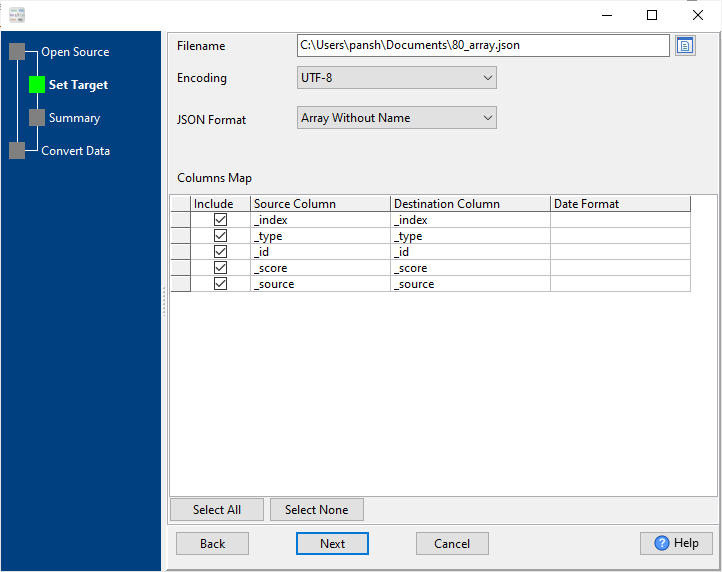
Step 4: Start Conversion
Click the "Convert" button to start the process. The conversion progress will be displayed, and you'll receive a confirmation when complete.
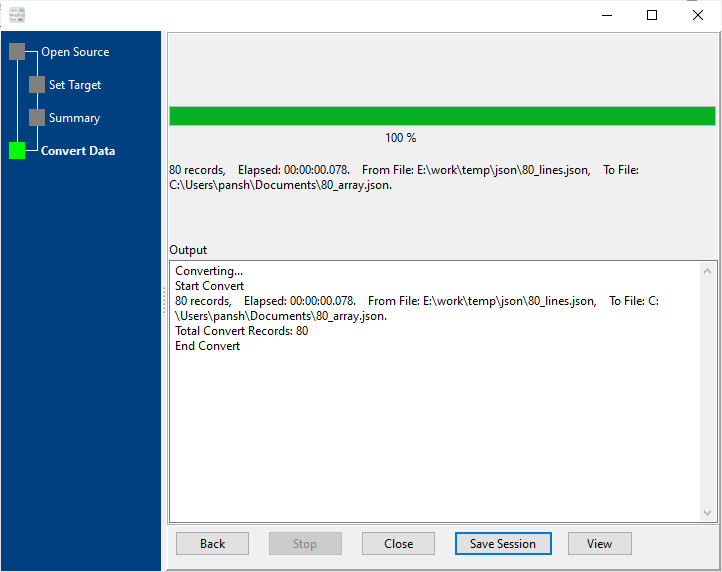
Note: For files with special characters or non-UTF-8 encoding, adjust the "Source Encoding" setting in Step 3 to match your file's encoding (GBK, ISO-8859-1, etc.).
Frequently Asked Questions
Get Started Today
Download DataFileConverter and start converting JSONL to JSON array in seconds.
Single installer supports Windows, macOS, and Linux. Free trial available.
✅ Free trial available | ✅ Full version with unlimited conversions | ✅ 24/7 technical support | ✅ No dependencies required