MySQL to DB2 Converter | Migrate & Sync Data Seamlessly

Easily convert, migrate, sync and automate MySQL to DB2 data transfer across Windows, Linux & macOS

Why Choose Withdata DBCopier for MySQL to DB2?

Single Table Transfer

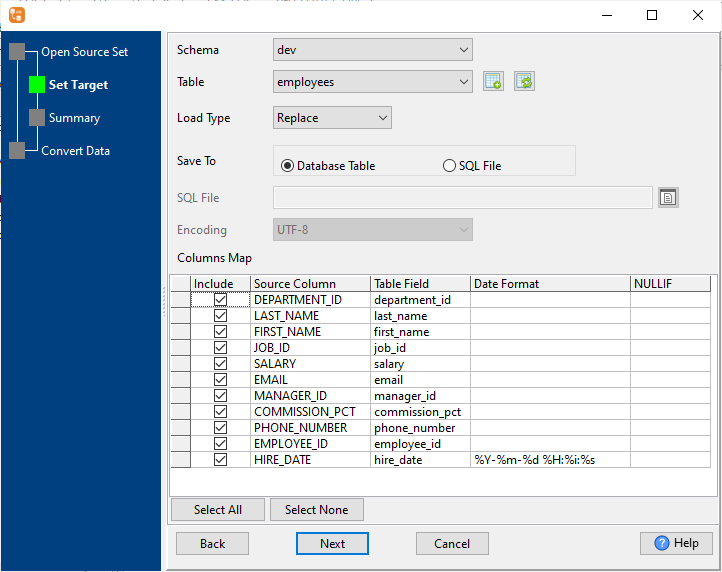
  • Precise field mapping & date format configuration
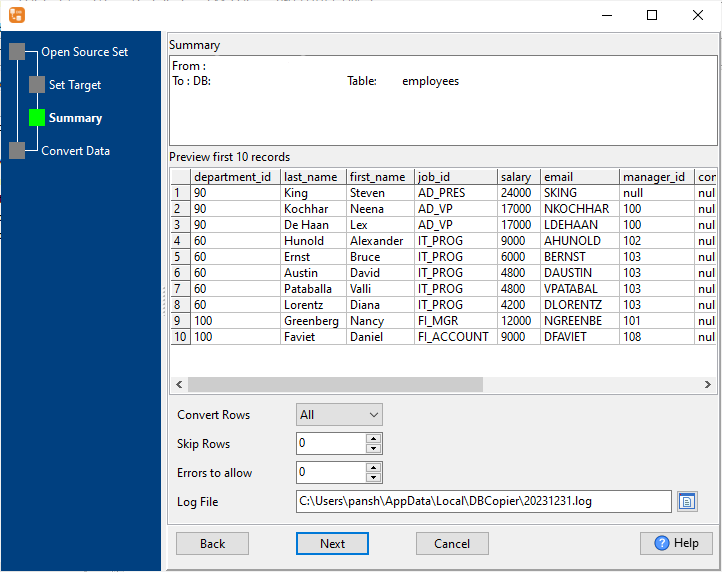
  • Preview data before transfer
  • Support replace/append/upsert import types
  • Custom NULL handling options

Batch Table Copy

  • Transfer multiple tables in one go
  • Auto-map to existing DB2 tables
  • Unified import settings for all tables
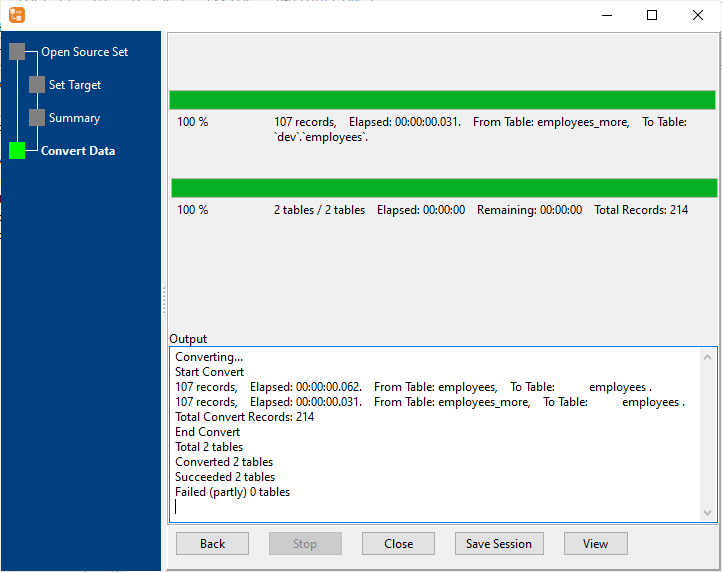
  • Real-time progress tracking

Query Results Conversion

  • Convert custom MySQL query results
  • Support complex queries with joins/filters
  • Preview results before transfer
  • No intermediate files needed

Table Merging

  • Merge multiple similar MySQL tables
  • Unified field mapping to DB2 table
  • Preview merged data
  • Fast combination of large datasets

Full Migration

  • Transfer structure + data + indexes
  • Auto data type mapping
  • Selective table migration
  • End-to-end progress tracking

Data Synchronization

  • Full sync (replace) or incremental sync
  • Update existing + insert new records
  • Support single/multiple tables sync
  • Detailed sync statistics

Automation & Scheduling

  • CLI support for script integration
  • Schedule recurring tasks
  • Support Windows Task Scheduler/Crontab
  • Automated log generation

Cross-Platform Support

  • Windows, Linux & macOS compatible
  • Local data conversion only (100% secure)
  • High performance (millions of rows/minute)
  • 24/7 technical support

Simple Workflows for All Use Cases

GUI Mode (Point-and-Click, No Code)

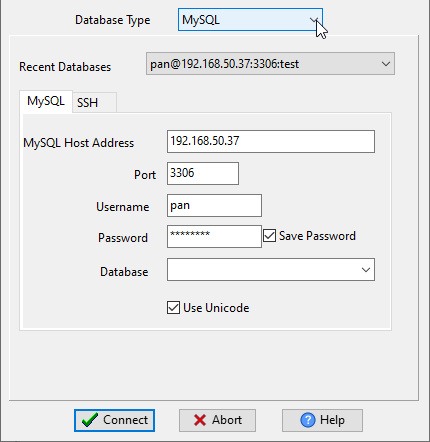
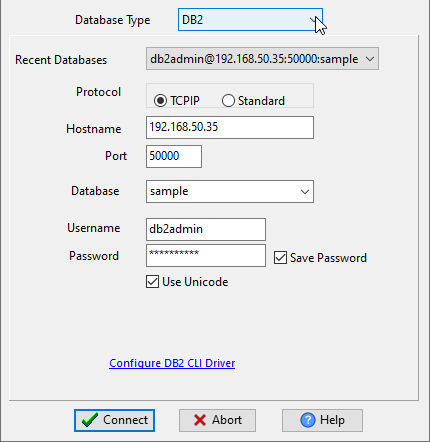
  1. Connect to your MySQL 📷 source and DB2 📷 target databases
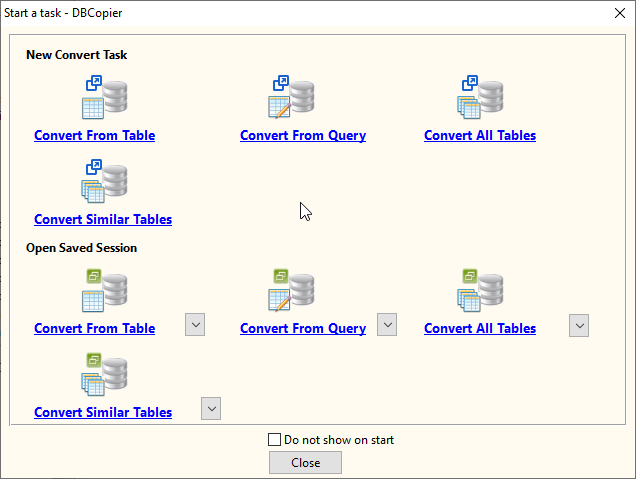
  2. Select task type ("Convert From Table" for table copy, "Convert From Query" for query conversion, "Convert All Tables" for merge tables, and "Convert All Tables" for batch copy, migrate, or sync.) 📷
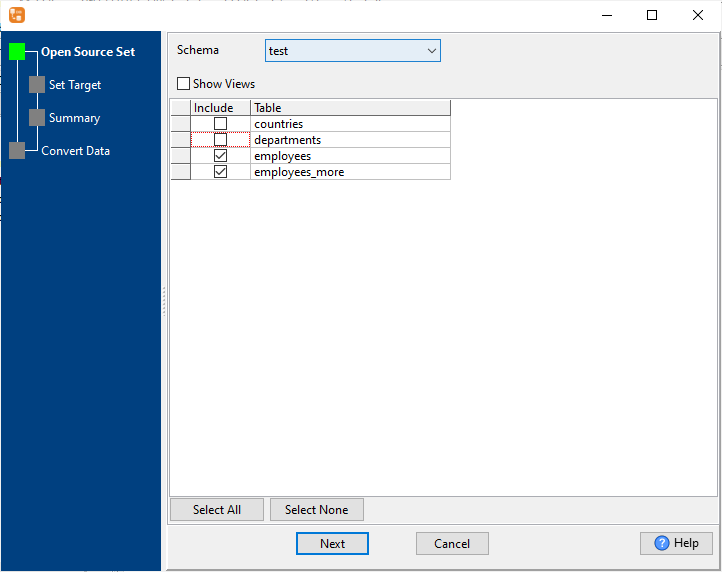
  3. Configure settings: select source data 📷, map fields 📷, set import type 📷
  4. Preview data to ensure correct mapping 📷
  5. Run conversion and monitor real-time progress 📷
  6. Save session for future reuse

CLI Mode (Command Line Interface)

  1. Create and save task configuration in GUI mode
  2. Execute task with a single command on any platform
  3. Integrate with custom scripts or CI/CD pipelines
  4. Get detailed execution logs for troubleshooting

Scheduled Automated Tasks

  1. Configure and test your MySQL to DB2 task in GUI mode
  2. Generate batch/shell script for the task
  3. Set schedule using Windows Task Scheduler (Windows) or Crontab (Linux/macOS)
  4. Monitor automated tasks via detailed log files

Frequently Asked Questions

How fast is the MySQL to DB2 data transfer?

DBCopier is highly optimized for speed—millions of rows are transferred in one minute. Transfer time depends only on your local network/disk speed (no cloud latency).

Is my data secure with DBCopier?

100% safe. All data conversion is performed locally on your machine—no data is uploaded to Withdata or any third-party servers.

Does DBCopier support Linux and macOS?

Yes. We offer native versions of DBCopier for Windows, Linux and macOS—full feature support across all platforms.

Can I automate recurring MySQL to DB2 transfers?

Absolutely. Save your GUI-configured session and run it via CLI, or schedule recurring tasks using Windows Task Scheduler or Crontab.

Will DBCopier create DB2 tables automatically?

Yes. DBCopier auto-creates DB2 tables with smart MySQL data type mapping and can also migrate all table indexes to DB2 automatically.

Can I merge multiple MySQL tables into one DB2 table?

Yes. The Convert Similar Tables feature lets you select multiple structurally similar MySQL tables and merge their data into a single DB2 table.

Get Started with Withdata DBCopier Today

Download Withdata DBCopier and start your MySQL to DB2 conversion, migration or sync task in minutes—no complex setup, no coding required. Free trial available with full feature access.

Download Free Trial