Level Data Studio: Professional LevelDB Management Tool

Powerful offline LevelDB manager for Windows, macOS, and Linux. No subscriptions, no hidden fees, 100% local processing for viewing, editing, importing and exporting LevelDB databases.
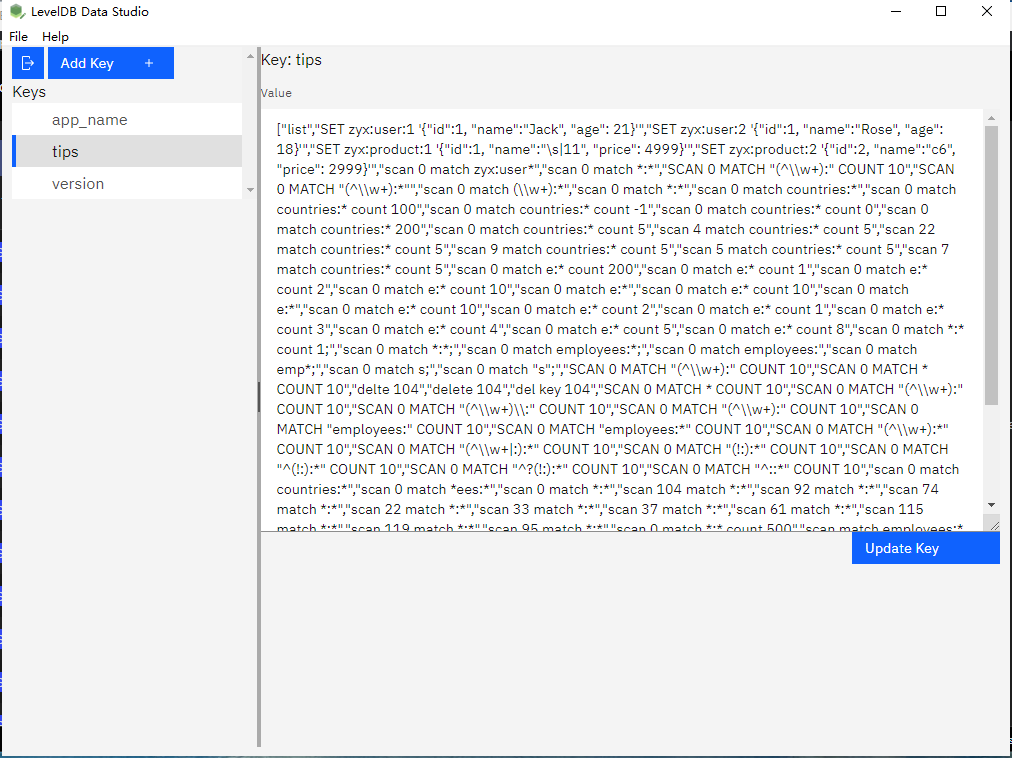
Level Data Studio interface showing LevelDB key-value browsing and editing features

Key Features of Level Data Studio

All-in-one LevelDB management tool with powerful features for developers and DB administrators

LevelDB Data Browsing

Intuitively browse and view LevelDB key-value pairs with advanced filtering

  • Tree view of LevelDB key-value storage
  • Advanced key/value filtering & search
  • Sort keys by name
  • Real-time data refresh

LevelDB Key-Value Editing

Edit, add, delete or modify LevelDB entries with ease

  • Edit existing key-value pairs
  • Add new entries with custom keys
  • Delete entries

LevelDB Data Export

Export LevelDB data to multiple popular formats

  • Export to JSON, CSV, XML
  • Custom export formatting options
  • Large database export optimization

Cross-Platform Support

Works seamlessly on all major operating systems

  • Windows 10/11 (64-bit)
  • macOS 10.15+ (Catalina and newer)
  • Linux (Ubuntu 20.04+, Debian 11+)
  • Consistent experience across platforms

How to Use Level Data Studio

Manage your LevelDB databases in just 3 simple steps

1

Open / Create LevelDB File

Select and open/create your LevelDB database directory

Frequently Asked Questions

Answers to common questions about Level Data Studio

What versions of LevelDB does Level Data Studio support? +
Level Data Studio supports all major versions of LevelDB including 1.18, 1.20, 1.21, 1.22 and the latest 1.23. The tool is backward compatible with older LevelDB databases and can handle both legacy and modern LevelDB file formats.
Does Level Data Studio require an internet connection? +
No, Level Data Studio is a fully offline application. All LevelDB processing happens locally on your computer - no data is ever uploaded to our servers or any cloud service. The only time you need internet is when downloading the installer (optional, as you can transfer it via USB).
Can I edit large LevelDB databases with Level Data Studio? +
Yes! Level Data Studio is optimized for large LevelDB databases and can handle files up to 10GB in size with millions of key-value pairs. We use memory-efficient processing and incremental loading to ensure smooth performance even with very large LevelDB files.
What export formats are supported? +
Level Data Studio supports exporting LevelDB data to JSON (including pretty print), CSV (comma-separated values), XML, TXT (plain text). You can export the entire database or just selected key-value pairs, with customizable formatting options for each format.
Is it safe to edit LevelDB databases with this tool? +
Yes, Level Data Studio includes multiple safety features to prevent data loss: automatic backups before editing, undo/redo functionality for all operations, transactional editing, and error recovery mechanisms. We recommend creating a backup before making major changes to critical LevelDB databases.

Ready to Manage LevelDB Effortlessly?

Download LevelDataStudio Free Trial
Download Now