Key Features
- Cross-platform support: Windows, macOS, Linux
- Both GUI and command line modes available
- Ultra-fast processing for large files and millions of rows
- 100% local processing to protect data privacy
- Support batch merging and automation via scheduled tasks
How to Merge CSV Files in 3 Steps
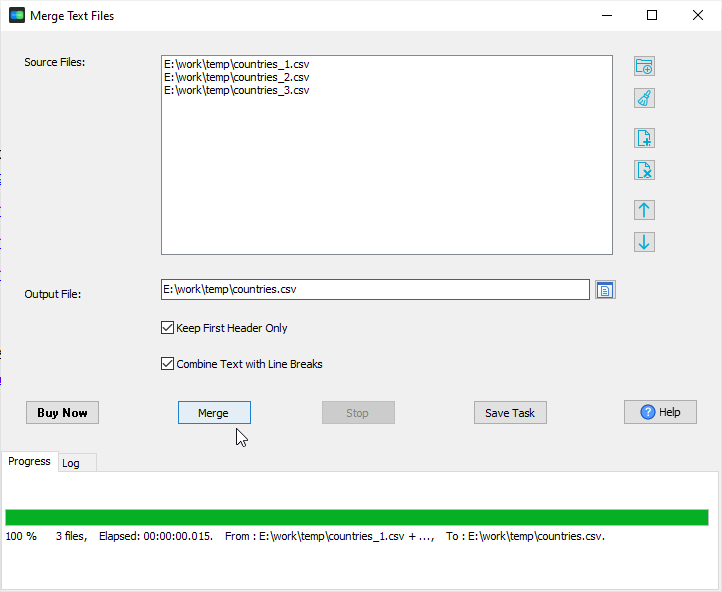
- Add CSV Files - Launch the tool, create a new task, and select all the CSV files you want to combine.
- Adjust Order - Rearrange file sequence to match your desired final CSV file.
- Merge CSV Files - Click the merge button to combine all CSV files to a single CSV file instantly.
Soruce CSV files
countries_1.csv:
COUNTRY_NAME,COUNTRY_ID,REGION_ID
Argentina,AR,2
Australia,AU,3
Belgium,BE,1
Brazil,BR,2
Canada,CA,2
countries_2.csv:
COUNTRY_NAME,COUNTRY_ID,REGION_ID
China,CN,3
Germany,DE,1
France,FR,1
Italy,IT,1
Japan,JP,3
countries_3.csv:
COUNTRY_NAME,COUNTRY_ID,REGION_ID
Netherlands,NL,1
United Kingdom,UK,1
United States of America,US,2
Output CSV file
countries.csv:
COUNTRY_NAME,COUNTRY_ID,REGION_ID
Argentina,AR,2
Australia,AU,3
Belgium,BE,1
Brazil,BR,2
Canada,CA,2
China,CN,3
Germany,DE,1
France,FR,1
Italy,IT,1
Japan,JP,3
Netherlands,NL,1
United Kingdom,UK,1
United States of America,US,2
Frequently Asked Questions
How long does it take to merge CSV files?
The tool processes data extremely fast. It can handle millions of rows in minutes.
Is my data secure when merging CSV files?
Absolutely secure. All operations run locally on your computer; files are never uploaded to any server.
Does it support command line on multiple operating systems?
Yes. It supports command line mode on Windows, macOS, and Linux.
Can I merge or convert multiple CSV files in batch?
Yes. You can merge or convert multiple CSV files at once efficiently.
Merge Your CSV Files Today
Download Withdata TextMerger to merge your CSV files easily and efficiently.
Download TextMerger
×
![screenshot]()